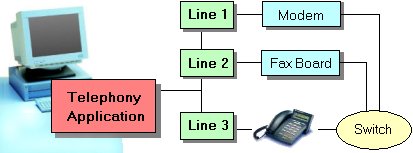
The line device is a physical device such as a modem, or an ISDN card that is connected to a network. The device may not be physically connected to the computer on which the TAPI application is running, such as a modem pool on a server. Line devices support communications capabilities by allowing applications to create communication sessions and to send information to or receive information from a network.
In hbTapi, the line device is represented by the ThbTapiLine component. ThbTapiLine is the base component to create and handle communcations sessions on the line device. In general you will have one ThbTapiLine component for each TAPI line device that your application uses. Sometimes you need to create instances of ThbTapiLine dynamically if your application has to handle a various amout of lines.
The line device has a set of properties which are used to detect the capabilities and status of the device. These properties are available as sub-properties of the ThbTapiLine.Caps and ThbTapiLine.Status properties. Capabilities are avaialble as soon as the device is selected by setting the DeviceName or DeviceID. Status information becomes available once the device is activated successfully.
Channels
Each line has one or more channels. Channels are exposed as addresses to an application, and the end user or server does not require specific knowledge of channels. Each channel can have its own address, which means a line could have as many addresses as it has channels. The precise relationship between channels and addresses exposed to an application is dependent on a service provider's implementation.
The address itself is a string that identifies a location on a network. In the case of a telephone network, the address is a telephone number. If the network is IP-based, the address may be an IP address.
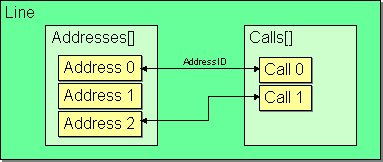
In hbTapi, an address is encapsulated by a ThbTapiAddress object. A line device can support multiple addresses e.g. to represent different phone numbers of the telephony system or MSNs of an ISDN-Card. The supported addresses are held in the ThbTapiLine.Addresses list and become available as soon as the device is selected. Different addresses have different features, capabilities, and states. Use the ThbTapiAddress object and it's Caps and Status properties to get such information.
Communications Sessions
A call is a communcations session and represents a connection between two or more addresses. The call plays a leading role within the computer telephony. It is used to establish connections, build conferences, transfer data and so on. The TAPI line device manages all inbound and outbound telephone calls.
The ThbTapiLine component simplifies the management of calls by giving you access to call related information and events while insulating you from the memory allocation and deallocation, call status, call creation and call destruction issues. ThbTapiLine is designed to manage multiple calls simultaneously where each call is represented by a ThbTapiCall object.
hbTapi has a well designed object model, so many functions are available at the call directly. As an example, each call has got it's own info and status information like the call's state or the remoty party's phone number (CallerID). The Make a Call and Receive a Call Quick Start chapters show some examples of using a ThbTapiCall object.
The calls currently available on the line device are held in the ThbTapiLine's Calls property. Each call is assigned to an address of the line by it's AddressID resp. Address property.